Software Configuration Management with Oracle Repository
|
Software Configuration Management with Oracle Repository |

Software configuration management is the process through which you control the evolution of an application from identification of components, through initiation, evaluation, authorization, development and implementation. It is also the process of recording and reporting the history and status of components and their changes.
Configuration Management tools enable the user to maintain the actual components of a product, record the history of the components as well as of the whole product, provide a stable working context for changing the product, support the manufacture of the product from its components, and coordinate concurrent changes.
Repositories and Configuration management systems are used to store a variety of information. The advantage in using an integrated repository and software configuration management environment is that the information store becomes the focal point for integrating the tools and applications that an organization uses.
There are many complexities associated with producing, releasing and maintaining software. Software configuration management addresses many of the problems you encounter, by helping you to clearly identify decisions that have been made and developments that have taken place.
The fundamental requirement of a software configuration management system is the ability to identify and track changes to data over time. It must also be able to maintain a history of the changes to the data as it evolves and allow users to access a particular version - not just the last version created.
Members of the software development team should be able to undertake development work without interference from other team members. Then, as each task is completed, the results should be available to other members of the team to include into their own work as and when required.
Configuration management tools should also enable parallel development, for example to enable maintenance work while development continues or to allow concurrent development of two versions of the same application. It should then be possible to merge the two development streams into one version to incorporate all the desired enhancements.
At appropriate stages in the development cycle, it should be possible to identify specific versions of objects and group them into a configuration, for example to build a test or release version of an application.
Software configuration management systems vary from one organization to another however, there are some features that are essential to all software configuration management systems, they include:
Oracle Repository addresses these requirements by providing individual workareas, controlled access to software configuration management functions and a range of utilities that enable:
A software configuration management system must provide all users, including designers, developers, testers and release managers, with a secure working environment.
Oracle Repository can support a large number of concurrent users. An individual user may not want to see a list of every version of every object in the repository. In addition, some kind of mechanism is needed to ensure that one user does not interfere with another user's work. Oracle Repository solves both these problems by allowing users to create individual workareas - specific views of the repository through which users can work on their own objects. In this way, users can avoid seeing objects belonging to other users, and users need not be concerned that their changes might be overwritten by someone else.
Version control is the process of managing and tracking changes, and is essential regardless of the size of your organization or the type of software you develop. All types of data can be version-controlled using Oracle Repository.
The purpose of maintaining more than one version of an object, is to preserve the content of that object at appropriate stages throughout development, allowing you to return to a specific point in the development cycle at any time. Over time, users can create a number of versions of an object. Oracle Repository records every change made to an object during its life cycle, using version numbering and version labeling systems for ease of identification of individual object versions. The record of the changes to a particular object is known as the object's version history.
Each object in the repository is held as a set of snapshots, called object versions, of its state at certain points in time. The object versions are linked together by associations that record how each object version evolved from its predecessors. This web of associations, represented by the version tree, is called the version history of the object and can show succession, branching and merging.
The version history associations also have a number of version control attributes, including:
Version events are also recorded against each repository object. These include:
An object becomes subject to version control when it is checked in to the repository for the first time. While an object is checked in it is write protected and therefore, cannot be modified. The object must be checked out before it can be changed.
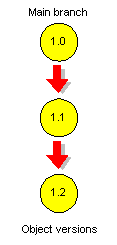
Each time an object is checked in, a new version is created. As an object evolves from one version to the next, a graphical representation known as a version tree also evolves. A simple version tree has only one branch, usually called the MAIN branch, as shown in the following illustration.
There are occasions during the software development process when it is not practical for all work to be performed on a single set of source files. The process of maintaining multiple versions of the same files is called parallel development. For example, you may use parallel development to:
The branch, compare and merge features supplied with Oracle Repository enable you to perform parallel development.
Branches are object version sequences that have their starting point at a particular version in an existing branch, but evolve independently. Each branch has a label that identifies its purpose. There are two stages to creating a branch, first you must create a branch label, then you must check in the objects that are to be accessed from the branch. Note, a branch is not created until it has at least one checked-in object.
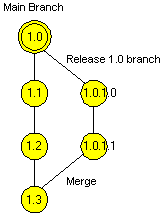
In the following example, an object that is used in the first release (Release 1.0) of an application has undergone further development on a branch to provide subsequent updates to that release (Release 1.0.1.0 and 1.0.1.1). However, a different set of changes to the object are required for Release 2.0, and this development has taken place concurrently with the Release 1.x development on the main branch.
Users can compare any two versions of an object provided they are the same object type, including any two versions of the same object or versions of two objects that belong to different family trees. The compare shows:
Users can merge any two versions of the same object or versions of two objects that belong to different family trees. The merge display shows:
Oracle Repository's Merge utility also allows users to manually include or exclude data in the merged version.
A merge between two versions of the same object implicitly involves a third object version. This is known as the common (or base) ancestor and is the version that both merging versions were derived from. The merge operation automatically selects the closest common ancestor (object version 1.1 in the example below).
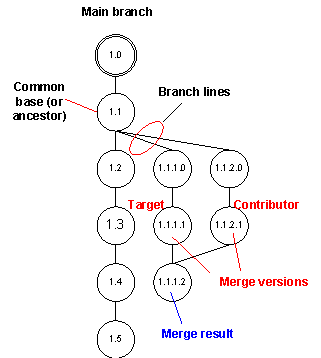
The two object versions taking part in the merge are known as the contributor and target. If the contributor and target versions reside on different branches then the target version branch will contain the new merged version.
Merging can be performed on objects in different family trees. However, in this instance there will be no common ancestor and all differences need to be resolved manually.
A merge typically involves the latest version of an offspring branch with the branch it originated from (ancestor branch), resulting in a new version in the ancestor branch. After such a merge, the offspring branch can continue to evolve, for example to allow bug fixes to a release. Subsequent repeat merges can then take place with the ancestor branch to reflect further development. Users can also merge to an offspring branch so that changes can be propagated in both directions of the branch hierarchy.
Security is provided to ensure that only the desired changes are incorporated into the current development of an object. When a user wants to check in a version of an object, the application checks to see if the object is on the tip of its branch. If not, the check-in is refused, and the user is prompted that a merge is required, as shown in the following example.
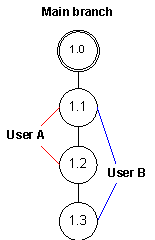
User A checked out, unlocked, the latest version (Version 1.1) of an object. Then User B also checked out the same version and tried to check it back in again after User A had already done so. Because User A created a new version (Version 1.2) when checking version 1.1 back in, User B’s version is no longer the tip version and must merge with the new tip version (Version 1.2) to create Version 1.3.
Oracle Repository is secure, robust, and scalable from an individual desktop to the entire enterprise. A secure and scalable architecture is essential to protect and distribute the repository contents, as the meta data (the descriptive information about the data) will most likely be used by many people all over the enterprise. Poor system performance, or lack of system availability, would reduce or even eliminate the value that can be gained from using the repository.
The repository itself consists of a large number of Oracle database objects; tables, indexes, views, packages, constraints, sequences, synonyms and triggers. The components of the repository can be grouped into three main types:
To enable users to work together in a carefully managed, secure development environment requires:
The repository acts as a central storage area for structured and unstructured data. Structured data (also known as 'repository objects') is the individual items of meta data that are the building blocks from which applications can be created. Application developers use software such as diagramming tools, either from Oracle (e.g. Oracle Designer) or from third-party suppliers, to create these object definitions in the repository. Unstructured data is all types of files and file systems e.g. Oracle Forms .FMB files, text documents, SQL scripts, images. Individual files or complete file systems can be copied into the repository (uploaded), and can then be accessed by applications being developed (e.g., text editors or word processors). Files created in the repository, or uploaded to it, can also be copied to any accessible file system (downloaded).
In this overview, we use the generic term 'object' to refer to both repository objects (structured data) and file system objects (files and file systems).
Within the repository, objects are stored in containers.
Containers are a means of organizing data in a logical fashion, and are similar to directories in a file system. Each object is owned by a container and has a set of audit properties that record details such as the date when the object was created and who created the object.
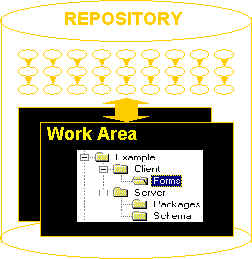
There are two types of container, folders and application systems, either of which can hold instances of any type of repository object. Folders are available even if you install only the core repository (for example when using the repository as a source control system). Application systems are available (as well as folders) if you install Oracle Designer, for application development.
A special folder, the system folder, contains a number of predefined language types, such as Java or Oracle Forms. You can use these when defining application modules, for example. The system folder also contains a predefined preference set for use with Form Generator, to optimize the look-and-feel of generated applications.
When you create a container, you are its owner. You can subsequently transfer ownership to another user. Any container can be placed under version control, as can any or all of the objects it contains, but objects and their containers are versioned independently of each other. A new version of a container is created when its owner either adds or removes objects in it, or changes one or more of its properties (for example its name).
Within the repository there may be many versions of objects. Oracle Repository has two primary mechanisms for managing versioned repository data:
An individual user may not want to see a list of every version of every object in the repository. In addition, some kind of mechanism is needed to ensure that one user does not interfere with another user's work. Oracle Repository solves both these problems with workareas.
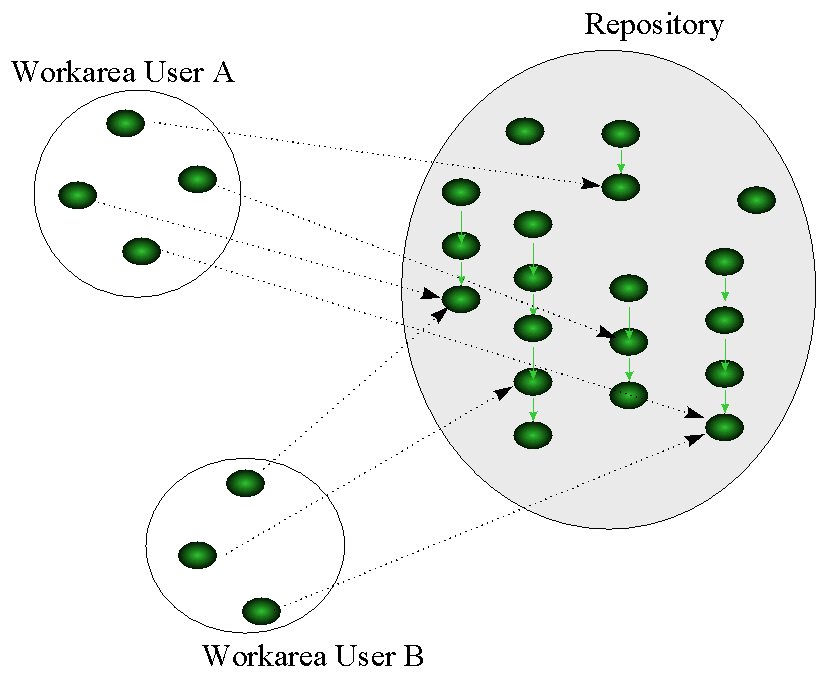
There are two types of workareas:
A configuration is a collection of repository object versions that are related in some way that is significant to an application. Usually a configuration represents all the object versions that represent a checkpoint in development or component of an application, for example, all the object versions that make up a payroll application, or a screen form used in that application.
Oracle Repository provides facilities for the management of configurations, rather like the idea of striping or labeling in some software configuration management systems. A specific object version that is included in a configuration is said to be a member of that configuration.
For example, when the development of individual objects reaches the stage where you can build a particular application, you need to specify exactly which version of each object is to be used for the build. The same applies when assembling a set of objects to be used for a test or included in a patch release - the configuration defines which versions of which objects are to be used:
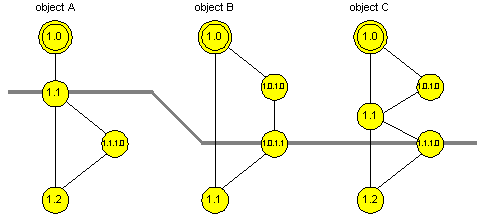
In this example, the configuration is represented by the thick line. The configuration includes version 1.1 of object A, version 1.0.1.1 of object B and version 1.1.1.0 of object C.
Access to the entire repository is controlled through the standard Oracle database access control features. Anyone wishing to use the repository must already have an account on the database where the repository resides. Only a user with database administrator (DBA) privileges can create user accounts on the database.
At the time the repository is installed, only the repository owner can access the repository. The repository owner can subsequently authorize other existing database users to access the repository.
Once an account is created access to the repository and the tasks users can perform are determined by:
The primary difference between repository privileges and access rights is that privileges are specified against users, whereas access rights are specified against repository objects. For example, the repository privilege that enables a users to create workareas may or may not be given to that user, depending on the security enforced by the organization
Repository privileges are typically controlled by the repository owner, who can optionally grant privileges to designated users. For example, the repository owner may grant the User repository privilege to the configuration manager, enabling the configuration manager to set repository privileges for other users.
Access rights are set against workareas, containers and configurations, by the users who own those items. Your access rights on any other type of repository object are determined from the object's owning container. For example, if you have Select access rights on a container, you also have Select access rights on all objects in that container.
Note, the repository has a PUBLIC user, that can be used to specify access rights for all repository users.
Oracle Repository provides users with policies that impose restrictions on the following version control features:
When an automatic branching policy is set, all checked-out objects check in to the default branch set for each workarea. Doing so ensures that specific development branches are not populated with new object versions at critical periods in development, for example during a build. If no default branch is set, or the automatic branching policy is not set, then objects check in to the same branch they were checked out from.
When automatic version labeling is set, the repository automatically assigns a label for an object version when it is checked in. This ensures adherence to a system-specified version labeling scheme.
Users have the option to lock an object version when they check out the object. However, locking does not prevent another user from checking out a copy of the same version. It only prevents that user from checking in onto the same branch until the locked version is checked in. The strict locking policy prevents any other versions of an object from being checked out from a branch once a version of that object has been checked out. This restriction remains in force until the first user checks the object back in.
Locking guarantees that only one person at a time can be in the process of creating a new version of an object for a particular branch. When the modified copy is checked in, a new version is added to the branch and the lock is released. Alternatively, a version can be checked out without a lock. This may be desirable to avoid one developer making a major change and locking the original branch over a long time, preventing a second developer from making a quick bug fix until the first change is completed.
For many repository users, it is important to assess the impact on the rest of an application of changing one component - a process known as impact analysis. For example, developers could investigate how many applications use a particular Java method, and thus discover whether a change to the method would have a significant impact across the enterprise.
Oracle Repository provides a set of tools that are useful for impact analysis. For example, the Dependency Analyzer is a utility that analyzes the relationships between objects in an application and allows users to determine the effects of change. Users then run a further utility on the analysis data: the Dependency Manager, which provides a graphical display of the details of dependencies between repository objects. Thus, for example, users can show whether a particular object uses, or is used by, another object, and you can display details about these dependencies.
|
|
|